 reversed-r.dev
UNIVERGE IX シリーズはNECのよく知られた白に青のブロードバンドルータですが、 その中でもIX2105はGE0が1ポート,GE1が4ポートの小さめの機体で、 中古市場で極めて安く手に入ります。
ファームウェアが、ない!
さて、そんなお手頃2105ですが、 ヤフオクなどで落としてくると大抵の場合、
Router# show version
NEC Portable Internetwork Core Operating System Software
IX Series IX2105 (magellan-sec) Software, Version 8.6.22B, MAINTENANCE RELEASE SOFTWARE
Compiled Dec 17-Mon-2012 17:13:51 JST #1 by sw-build, coregen-8.6(22)

ROM: System Bootstrap, Version 2.2
System Diagnostic, Version 2.2
Initialization Program, Version 2.1

System uptime is 2 minutes
System woke up by reload, caused by power-on
System started at Aug 19-Wed-2026 17:05:46 JST
System image file is "ix2105-ms-8.6.22.b.ldc"

Processor board ID <0>
IX2105 (MPC8314E) processor with 131072K bytes of memory.
2 GigaEthernet/IEEE 802.3 interfaces
512K bytes of non-volatile configuration memory.
16384K bytes of processor board System flash (Read/Write)
ファームウェアが古い!
v8.6.22Bだそうで、
Compiled Dec 17-Mon-2012
から考えるに十数年前にリリースされたものを以降一度もアップデートしていなかったことになります。
さらに問題としては、遥かに昔の機体であるためにすでに公式のサポートは終了(EOL)しており、 NECのホームページから最終版ファームウェアのダウンロードページすら消えていることです。
最終版はv10.2.42らしいですが…。
ファームウェアが、ある!!
NEC公式のダウンロードページは https://jpn.nec.com/univerge/ix/Download/ix2105/index.html が往時のURLでした。
ところで、Webアーカイブというものがありますね。 最も知られているのはその名の通りこちらでしょう。
よく知らないですが皆さんこちらに行かれているようですよ。
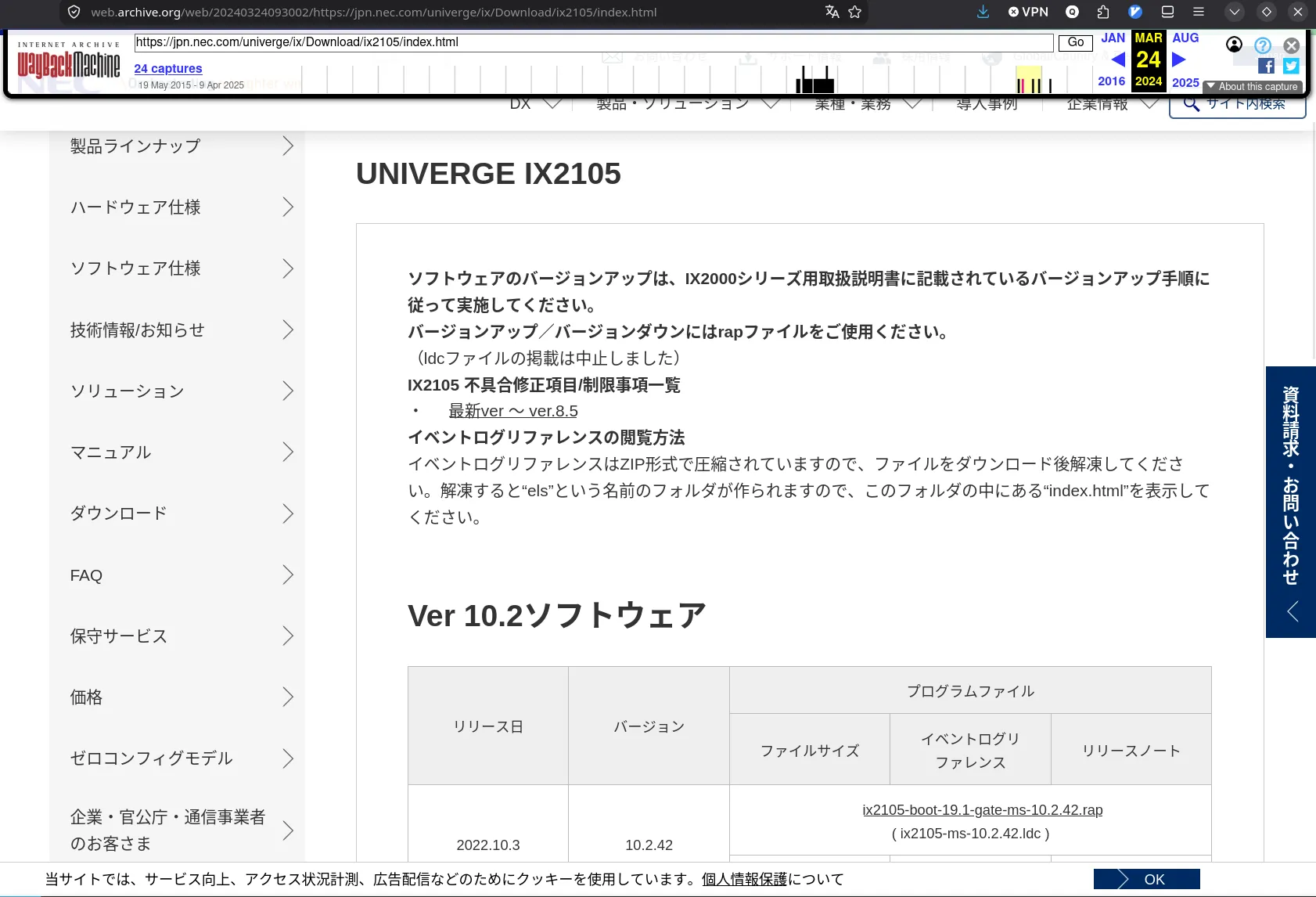
なお、少なくとも2024年内は最終版が公開されていたようです。
ちなみに、IXのファームウェアの公開スタイルの変遷としては、 人づてに聞いたりネット上の残骸などを見るに、
エンプラ製品なので代理店経由で取得 -> ダウンロードページにフォームが生えて申請すると落とせるようになった? -> 普通に公開されるようになった -> IX2105がEOL
という風になっていそうです(まあ本題じゃないのでちゃんと調べていません。間違っているかも。当時ちゃんと見ていた人に聞いたほうが正確だと思います)。 IX2105史的には2024年という短い期間だけ誰でもファームが容易に取得できるようになっていたわけで、ある意味奇跡の1年かもしれません。
なお、他の人もだいたいおんなじことをしているようですね。
TFTPで入れていく
こういう組み込み機器あるあるらしいですが、 FTPの小さい版であるところのTinyFTP、つまりTFTPでPCなどでファームをサーブしておき、 IXが持っているTFTPクライアントでそれを落として入れていきます。
今回はtftp-hpaを使いました。
さっき落としてきたzipを解凍して出てきた ix2105-boot-19.1-gate-ms-10.2.42.rap を /srv/tftp/ など、
サーブしやすい位置に置き、
in.tftp -v -L -s /srv/tftp/としてやると簡易的にTFTPサーバが立ちます。
-vはverbose, -Lはsystemdのサービスとして立てるんではなく簡易的に立てるよというオプション、-sでサーブするパスを指定ということのようです。
あとはIX側から以下のようにsoftware-updateコマンドでサーブしているURLを指定してやると
(当然PCとIXが同じネットワークにいる必要はあります。configが空のIXなら一時的に適当なIPを割り当てるかDHCPクライアントを有効にするかしてIPアドレスを持っているようにすればよいです。)、
Router(config)# software-update tftp://10.240.255.171/ix2105-boot-19.1-gate-ms-10.2.42.rap
% Downloading ..............................................................................................................................................................................................................................................................................................................................................................................................................................................................................
TFTP transfer complete, 7564355 bytes, MD5 = 4e9d6e8b62bafcc5ed620691364a45ab
% Check ...... done
% Update file name is ix2105-ms-10.2.42.ldc
% Writing ..................................................................................................................................................................................................................................................................................................................................................................................................................................... done
% Software update completed.
完了したらしいです。
reloadコマンドなり、電源切るなりして再起動すると、
%BOOT-INFO: Trying flash load, exec-image [ix2105-ms-10.2.42.ldc].
Loading: #################################################################################################### [OK]


Starting at 0x20000

Configuring router subsystems (before IDB proc): done.
Constructing IDB(Interface Database): done.
Configuring router subsystems (after IDB proc): done.
Initializing router subsystems: done.
Starting router subsystems: done.

All router subsystems coming up.


XXXXXXXXXXXXXXXXXXXXXXXXXXXXXXXXXXXXXXXXXXXXXXXXXXXXXXXXXXXXXXXXXXXXXXXXXXXXX

WARNING! Administrative username is not configured!!
         Action: Please configure administrative username.

XXXXXXXXXXXXXXXXXXXXXXXXXXXXXXXXXXXXXXXXXXXXXXXXXXXXXXXXXXXXXXXXXXXXXXXXXXXXX


NEC Portable Internetwork Core Operating System Software
Copyright Notices:
Copyright (c) NEC Corporation 2001-2019. All rights reserved.
Copyright (c) 1985-1998 OpenROUTE Networks, Inc.
Copyright (c) 1984-1987, 1989 J. Noel Chiappa.
Router# show version
NEC Portable Internetwork Core Operating System Software
IX Series IX2105 (magellan-sec) Software, Version 10.2.42, RELEASE SOFTWARE
Compiled Sep 09-Fri-2022 13:40:53 JST #2 by sw-build, coregen-10.2(42)

ROM: System Bootstrap, Version 19.1
System Diagnostic, Version 19.1
Initialization Program, Version 2.1

System uptime is 0 minute
System woke up by reload, caused by command execution
System started at Aug 19-Wed-2026 17:19:24 JST
System image file is "ix2105-ms-10.2.42.ldc"

Processor board ID <0>
IX2105 (MPC8314E) processor with 131072K bytes of memory.
2 GigaEthernet/IEEE 802.3 interfaces
512K bytes of non-volatile configuration memory.
16384K bytes of processor board System flash (Read/Write)
ちゃんと更新されたファームで起動していそうですね。